
LawnNova is still in closed beta. Spray water did not arrive as one tidy drop. It landed over several builds, because the first honest version still left people guessing at the tank, and the later versions had to live where you actually mix.
I’m Steve. This is me talking, not a changelog written by committee.
The guess I kept seeing
Australian liquid labels usually give a water range per 100 square metres. That is useful on paper. It is not a tank volume for your front lawn.
If the lawn is 145 square metres and the label says 2.9 to 7.3 L per 100 m², you still have to translate that. People guess. They fill the backpack until it looks right. They run out halfway and remix. The ugly case is extra passes: walk the lawn twice for coverage, then double the product as if each pass were a new job.
Product amount belongs to the lawn and the label. Water belongs to the kit you are holding. Mixing those up is how you burn grass or waste a bottle.
Show the water where you mix
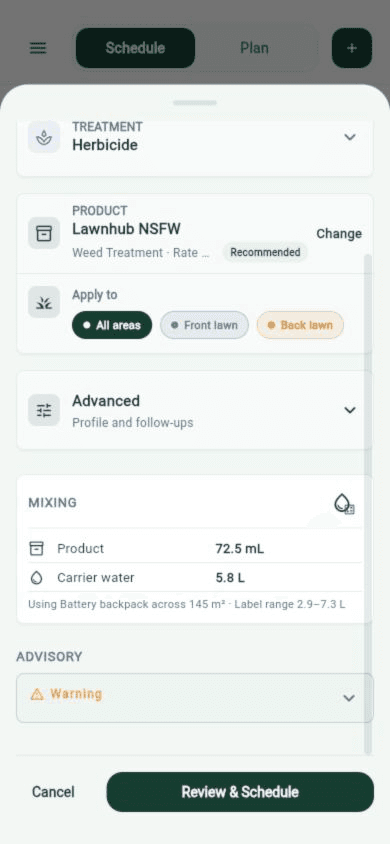
The first useful change was putting carrier water on the Add Treatment mixing card, next to product. Scale the label range to the area you actually selected. If you have not saved a sprayer yet, you still get an honest range for this lawn, not a per-100 m² figure you have to do in your head.
That is why the same number later sits on Task detail, in the compact row with area, amount, and rate. One glance before you walk outside.
Once you pick a saved sprayer, the range collapses to an exact litres figure. Same product dose. The water changed because the backpack changed.
Measure the kit once
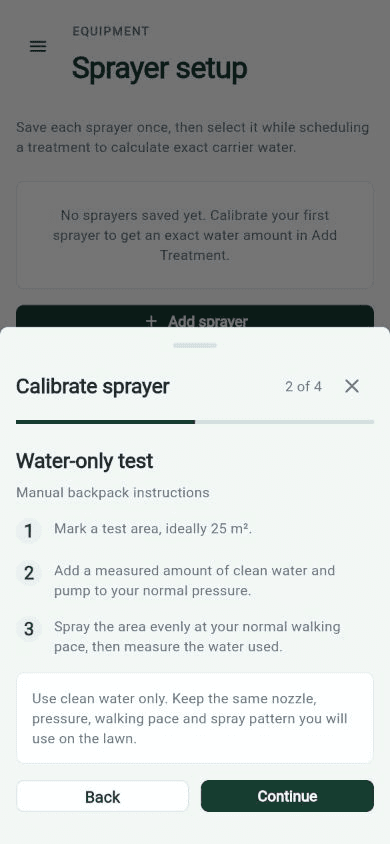
A label cannot know your nozzle, your walking pace, or whether the unit is a battery backpack or a hand pump. The only honest way to get an exact number is a water-only test on a marked patch, at the pressure and pace you will actually use.
Calibrate sprayer walks that: mark an area, add measured clean water, spray it the way you spray the lawn, then save the output. Do that once per sprayer.
The first wizard was too long. I tightened the steps so the water-only instructions stay on the phone without scrolling the job off the screen.
Pick the backpack, keep the dose
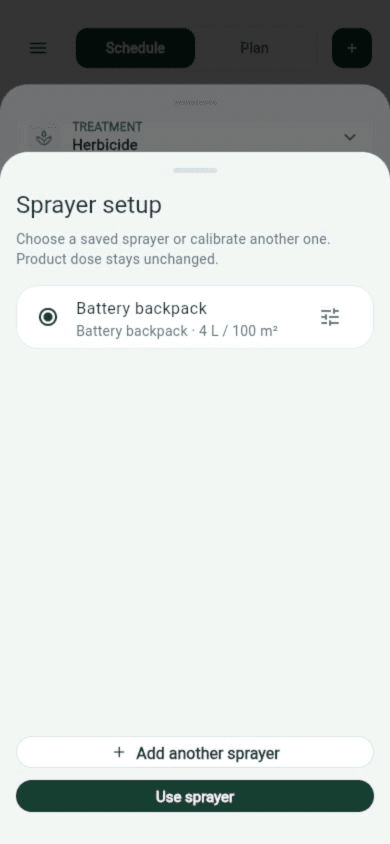
Save each sprayer once. When you schedule a treatment, Sprayer setup is a chooser, not a second rate editor. Pick Battery backpack, or calibrate another one. The subtitle is the rule: product dose stays unchanged.
That rule took a few passes to get into the UI everywhere it needed to be. If changing water quietly moved the millilitres of product, the feature would be unsafe. The mixing card still shows the label range underneath the exact litres, so you can see what the backpack did to the water without losing the original band.
Extra passes are water, not product
Some backpacks put down less water than the label minimum in one walk. The useful answer is even extra passes of the same mix, not a second dose of product.
The mixing card says that in plain language: product amount is for the whole job, not each pass. If the sprayer still cannot hit the label range without an absurd number of walks, LawnNova tells you to recalibrate or pick another unit. It does not quietly invent a mix.
Change it on the morning of the job
Add Treatment is where you first pick the sprayer, because that is where the mix is decided. Task detail is where you notice the number on the morning of the job.
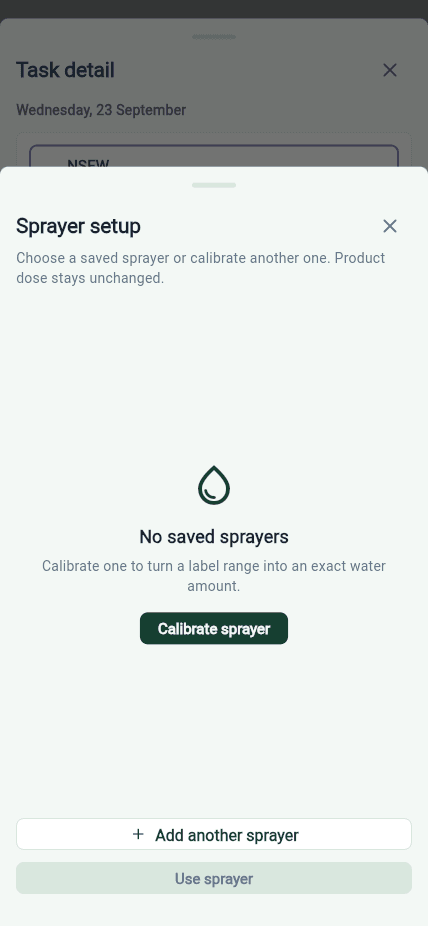
Tapping carrier water now opens Sprayer setup from Task detail. Choose a saved unit or calibrate another one. Product dose stays unchanged. If nothing is saved yet, the empty state is the reason to calibrate, not a dead end.
The first versions only did this while adding a treatment. Opening the same sheet from an already scheduled job came later, once it was obvious people check the mix the morning they spray, not only the night they tap Review and Schedule.
A calculator that does not create a job
Saved sprayers also live under More, as Spray Mix Calculations. Name them, calibrate them, manage them, then select one while you schedule.
There is a Calculator button on More as well. Type a label rate and a water range, pick an area, and it scales the mix. It does not look up the catalogue, and it does not create a treatment. That is for the bottle already in the shed and the job that is not on the plan yet.
What I took from it
Put the litres next to the mix. Equipment settings are where sprayers are managed, not where a homeowner decides the tank on a Sunday morning.
Calibration is water only. If picking a sprayer moves the product dose, the model is wrong.
Empty states have to say why you would bother. Calibrate one to turn a label range into an exact water amount is the whole feature in one sentence.
Even coverage cannot become a second dose. Extra passes share the same mix.
A mix calculator that creates a treatment is the wrong tool for a bottle in the shed.
Would love to hear your feedback. If the litres look wrong for your kit, send a screenshot of the mixing card and tell me the sprayer. If the empty state is confusing, tell me that too.
None of this is in the public App Store yet. Calibration and exact carrier water are in the closed beta builds testers already have. Opening Sprayer setup from Task detail is in the work sitting on main for the next drop.
If you want in, apply at lawnnova.com.au/beta.
Steve